Furniture and home5 min read
Summer sale prep for ecommerce furniture, month by month
A timeline for getting an outdoor range ready for a short selling season: stock, product content, 3D models, ads, and the deadlines that can't move.
By CharpstAR · 4 Oct 2023 · Updated 22 Sept 2026
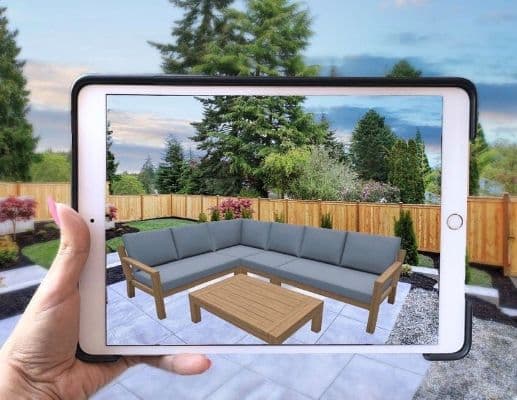
Outdoor and summer ranges take most of their year's revenue in a few weeks. The weather decides when those weeks start, and a garden set that isn't on the site by the first warm weekend misses some of its best selling days.
The costly mistakes tend to be about timing. Content is ordered late, or a product page goes live with placeholder images in week two of a six-week season. The checklist below is ordered by when each job has to be finished.
Planning backwards from the first warm weekend
We'd anchor the plan to the first weekend of good weather in your main market, since that's when demand turns up, and treat the campaign launch date as secondary. Nobody can predict that weekend exactly. You do know the earliest it could plausibly come, so be finished by then and count every line in the table back from it.
| When | What has to be done | Why it cannot slip |
|---|---|---|
| 6 months before | Range locked, quantities committed, supplier lead times confirmed | Every later step depends on the final range |
| 5 months before | Content brief written for every SKU, gaps identified | Commissioning needs a complete list |
| 4 months before | 3D models and photography commissioned | The longest lead time on the list |
| 3 months before | Product data complete: dimensions, materials, care, assembly, weight | Copy and product feeds are built from it |
| 2 months before | Pages built and staged, 3D viewers and AR live on staging | Leaves time for fixes |
| 6 weeks before | Page speed tested on a real phone on cellular data | A slow page costs most at peak traffic |
| 4 weeks before | Ads built with the new assets, feeds validated, stock synced | Ad review and feed approval can take a while |
| 2 weeks before | Everything live, soft launch, fix what the first real traffic reveals | Demand can start before the campaign |
Why the content deadline is the hard one
A garden set photographed outside in February in northern Europe won't look like summer. The options are a studio shoot with no garden in it, a shoot abroad at a higher price, last year's images with the new products missing, or a 3D model that can be rendered in any setting and any weather.
The order things arrive in matters too. Samples of a new outdoor range often turn up only weeks before the bulk shipment, sometimes after the content deadline. A model can be built from the manufacturer's CAD files or drawings before any sample lands, so the range can launch with images for every product instead of with three gaps. Putting a test model of one product next to your own photography before the four-month line tells you whether models are good enough to commission for the whole range, and with prices set per product, that one test also gives you the budget line for the rest.
Once the model exists, a table in five finishes is one model with five materials, and each extra variant costs little. Sweef sells its modular sofa as one configurable system because the sofa has more combinations than any shoot could cover. The product page viewer, the AR button, ad creative, email and the print catalogue can all come from that one file.
Where 3D and AR fit in the plan
Outdoor purchases often come down to size. Will the table fit on the balcony, does the parasol clear the railing, how much of the patio does the lounge set take? A 3D viewer with dimension lines shows that on the product page.
AR placement at true scale makes sense for the large, expensive pieces that cost a lot to ship back. Scene Viewer on Android reads one unit in the file as one metre (Google's documentation), so the model has to be built to the real measurements. We wouldn't add AR to cushions and small accessories.
Other checks before the season
Test page speed on a phone over mobile data. People browse outdoor furniture from the garden or the balcony, often on a cellular connection, and a page that loads fine on office wifi can stall there. Shopify's 3D commerce guidance puts the ideal GLB at around four megabytes and optimises files over fifteen megabytes automatically, so check the model sizes and test on a throttled connection.
Keep stock in sync across channels, so a busy weekend can't sell four hundred units of something you have ninety of.
Show delivery times on the product page. Bulky outdoor goods can take weeks to arrive, and shoppers who first see that at checkout tend to leave.
Put assembly instructions on the page before purchase, since assembly is a common reason garden furniture comes back.
Write out the returns policy for large items: what happens, who collects the item and who pays for it.
Measuring it so next year is easier
Record a baseline before the season starts, because once it's under way you won't get a clean comparison. Per product, track conversion rate, return rate with the reasons given, customer service contacts before the sale and, if you have a 3D viewer, how often shoppers open it. Then compare products that have models with similar products that don't, in the same season. Comparing this summer with last summer mixes the weather into the result.
For heavy goods, log the return reason on every collection, so next year's brief can say which products needed clearer dimensions or assembly information.
Sources
- Google, Scene Viewer documentation.
- Apple, AR Quick Look.
- Shopify, 3D e-commerce guide.
- Shopify, merchant data on 3D and AR content, September 2020.
- Shopify, AR shopping: Rebecca Minkoff and Gunner Kennels results.
- National Retail Federation and Appriss Retail, 2023 Consumer Returns in the Retail Industry.