Furniture and home11 min read
3D CPQ Software for Furniture Brands: Quotes and Costs
What 3D CPQ software does for a furniture brand that quotes made-to-order products, how the quote is produced on the product page, and what it costs.
By CharpstAR · 23 Oct 2026
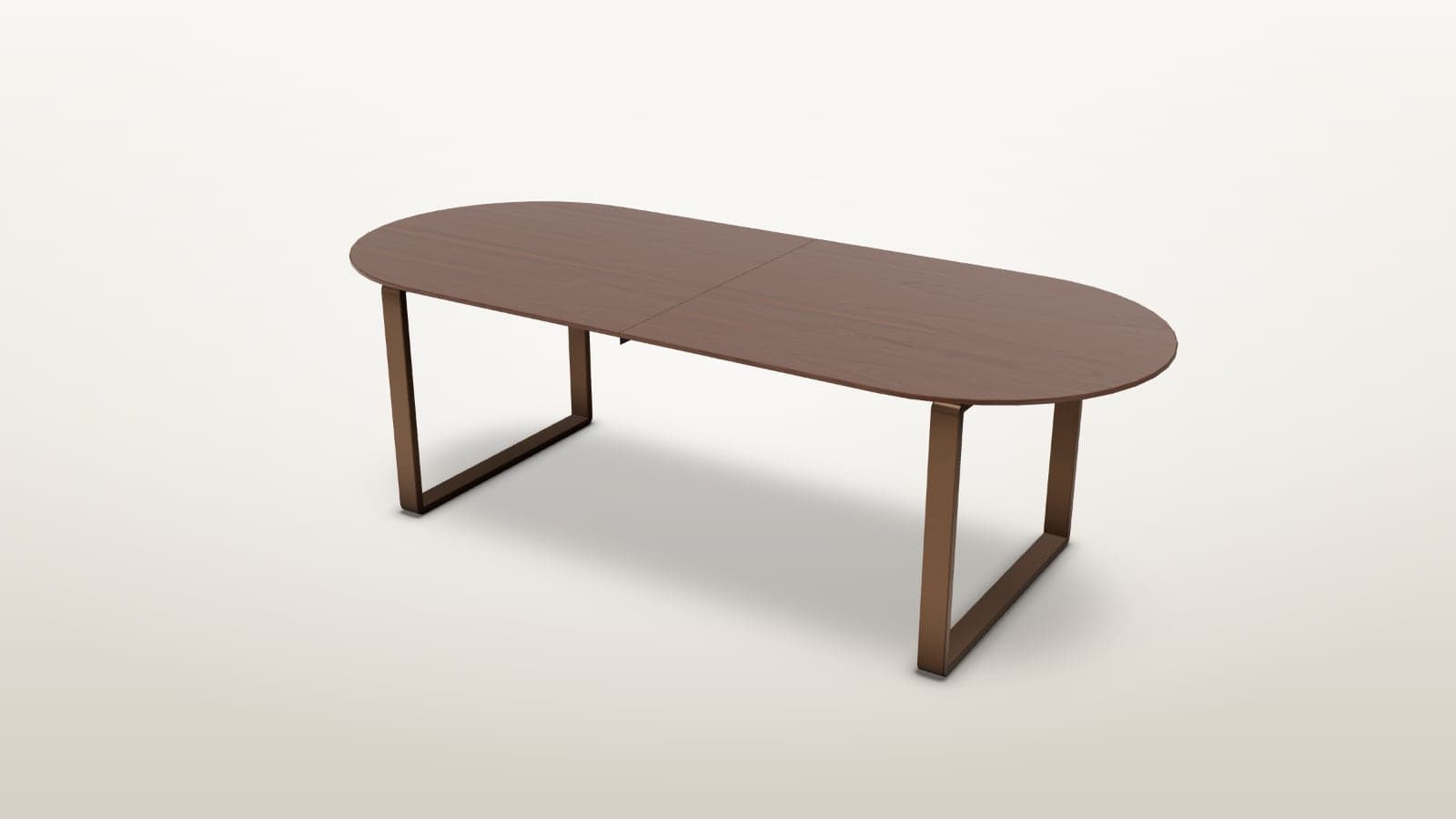
A restaurant group asks for a quote on twelve dining tables: walnut, 240 cm long with two extension leaves, on a steel base. Your sales team checks which sizes the table is made in, works out the walnut surcharge for that size, adds the leaves and the base, looks up the lead time and sends a quote two days later. By then the buyer has two other quotes, and none of them has a picture of the table.
3D CPQ software puts a model of the table in front of that process. The buyer sets the size, the top, the base and the leaves on the table itself, sees the price of what they built and downloads the quote on the spot. The quote is a PDF with a picture of the configured table, the specification with your option codes, the price line by line and a link that reopens the same configuration, so when the buyer sends you the quote you see exactly what was built. The same quote downloads as a JSON file for your order system or CPQ software.
Try the table below. It runs configure, price and quote on one 3D model: the buyer configures the size, the top, the edge, the base and the extension leaves, sees what each option adds for the size they chose, and downloads the quote.
Set the size, the top and the base and add a leaf: each option shows what it adds at that size. Press Get your quote to download the quote as a PDF or as JSON.
Open the configurator pageWhat Is 3D CPQ Software?
CPQ stands for configure, price, quote. It is the software a sales team uses to build an order for a product with many options, price the combination and send the quote. With 3D CPQ, the buyer configures the product on a 3D model they can turn, and the price and the quote follow from what they built.
With 3D CPQ on your product page, a buyer can:
- Choose the size, the materials and the options on a model of the product itself
- See the price of the combination they have built, with the surcharge of each option
- Read the lead time that the chosen parts set
- Check the measurements against the space the product is going into
- Place the configured product at real size in their own room on a phone
- Download the quote as a PDF for the people who sign off, or as JSON for an order system
- Reopen the same configuration later from a link in the quote
The table above shows configure, price and quote on one product, and our 3D CPQ page shows them on a parametric garden shed.
Why Use 3D CPQ Software for Furniture E-commerce?
Furniture sold in sizes, materials and options is quoted by hand in many companies, even when the same products are also sold from a product page. Each quote takes a sales person's time, and the buyer waits. 3D CPQ moves the configure and price steps to the product page and leaves your sales team the orders that need a person.
Faster Quotes
The buyer builds the product and gets the price while they are on your page. They download the quote on the page, with the configured product drawn on it, instead of waiting for it by email.
Fewer Wrong Orders
A buyer who has turned the model round in the wood and the base they chose knows what they are ordering. The order arrives with the option codes of what they built, so the product that is made matches what the buyer saw on screen.
Higher Order Value
Options are easier to choose when the buyer can see them on the product. A walnut top, a steel base or an extension leaf shows its price next to the choice, for the size the buyer has set, and the buyer adds it with one tap.
One Product Page for Trade and Consumers
A consumer orders one table from the product page and the order goes to your checkout. A restaurant builds the same table for its dining room, enters twelve, gets the trade price and sends the quote to the owner. Both start from the same model and the same rules.
Lower Photography Costs
One 3D model shows the product in every size, material and finish you sell: the table above can be built 12,636 ways. When you add a wood or a base, we add it to the model, and there is no new photo shoot.
Use Case: Made-to-Order Dining Tables
Dining tables are a strong fit for 3D CPQ. A table is made in several sizes, woods and bases, often with extension leaves, and each choice changes the price and the lead time. Restaurants, hotels and offices order them in quantity, and a private buyer wants to see the exact table before paying for a piece that is made to order.
How 3D CPQ Works on a Product Page
The buyer opens the product page and:
- Sets the length and the width and sees how many the table seats
- Picks the top, the edge and the base on the table and turns it to see them
- Adds extension leaves and pulls the table out to its full length
- Sees the price, with each option's surcharge for that size
- Enters the quantity and downloads the quote as a PDF or as JSON
The table above does each of these steps. The configurator only offers combinations that you make: a steel base comes only in powder coats, and two leaves only from 200 cm, so every quote can be produced.
What Reaches Your Sales Team
The quote is a PDF the buyer saves, with a quote number, the date and the day its prices hold until. It carries the configured table as drawn on screen, the specification with your option codes, the price line by line, the delivery estimate and a link that reopens the same configuration. When the buyer sends you the quote, your sales team opens the link and sees the table as it was built, with the option codes to order from. The JSON file holds the same quote in a form your systems read: every selection with its code, the lines, the totals, the currency and the link.
| Quote line | What it holds |
|---|---|
| Number and date | A quote number, the date and the day the prices hold until |
| Product | The table, drawn as it was built |
| Size | The length and the width, and how many it seats |
| Top, shape and edge | The wood or linoleum, the shape and the edge, each with its option code |
| Base | The style and its finish |
| Extension | The leaves and the length pulled out |
| Price | The list price for the size, each option's surcharge, the quantity, the trade price and delivery |
| Delivery | The lead time set by the slowest part, and the date |
| Link | The saved configuration, which opens in the configurator |
Your CPQ System or the Configurator
If you already run CPQ software, the rules stay there. The configurator passes the chosen options to it as option codes, and your CPQ system checks them, prices the combination and issues the quote. If you don't run CPQ, we set the rules in the configurator: the allowed combinations, a surcharge per option and a lead time per part. Our article on pricing rules and lead times covers how those rules are set up.
Configurators We Have Built for Furniture Brands
CharpstAR has built 3D models, configurators and AR for online shops and brands since 2016. Our case studies include a configurator for sofas sold in modules and fabrics and one for stoves sold through retailers, and our configurator demos show live prices following the options on a chair, a garden set and the shed.
How to Add 3D CPQ to Your Website
You don't need to replace your shop or your CPQ system. The configurator goes on your existing product page, and the quote and the order go where you already handle them.
Step 1: Send Us a Product
Send us a link to the product page, the list of sizes, materials, finishes and options with their prices and surcharges, and the lead time of each part. CAD files help but aren't required, and we'll ask for samples or close photos of the materials.
Step 2: Get a Plan and a Price
Within a working day, we tell you what the product needs, whether the rules are kept in your CPQ system or in the configurator, and what it would cost.
Step 3: We Build the Model and the Rules
We create the 3D model with every material and finish, set up the prices, surcharges and lead times, and connect the quote to your CPQ system or produce it in the configurator. A product with options on its parts is usually live in about two weeks from the day we have the options and the reference. Products that resize to measurements and ranges built from modules take longer and are quoted separately.
Step 4: Go Live
The configurator goes on your product page as one snippet on Shopify, Shopware, Magento, WooCommerce or a custom-built site. Consumer orders go through your checkout, and business buyers send you the quote with the link to what they built.
How to Measure the Return on 3D CPQ
Measure it against the figures your sales team and your shop already track:
| KPI | What to measure |
|---|---|
| Time to quote | How long a buyer waits for a quote, before and after |
| Quotes downloaded | How many buyers take a quote from the product page |
| Quote-to-order rate | Whether quotes with a picture of the configured product are accepted more often |
| Average order value | Whether buyers choose dearer materials, bases and more options |
| Wrong orders | How many orders come back because the product was not what the buyer expected |
| Customer service questions | Whether there are fewer questions about materials, sizes and lead times |
| Photography costs | How many material and finish photo shoots you no longer need |
Results depend on your products, your buyers and your prices, so compare the same products before and after, or run an A/B test on the product page.
How Much Does 3D CPQ Software Cost?
The configure part, a product with colour and material options on one model, is part of the Value plan, which starts at 20 dollars per model per month for at least 100 models over 24 months. The 3D models, hosting, updates and implementation are included, and there are no setup fees.
The price and quote parts depend on whether the rules are kept in your CPQ system or in the configurator. Connecting the configurator to your CPQ system, or setting up surcharges, lead times and the quote PDF and JSON in the configurator, is quoted per product range, as are products that resize to measurements and ranges built from modules. Before you decide, we build a working configurator on one of your own products, and there's no contract until you've tested it on your page.
Our article on 3D product configurator cost goes through the plans and what changes the price.
Is 3D CPQ Right for Your Business?
3D CPQ may be a strong fit if your products:
- Are sold in sizes, materials or options with their own prices
- Are quoted by a sales person today, by email or from a spreadsheet
- Are bought by businesses as well as consumers
- Are made to order, with lead times that depend on the parts
- Have a high order value, or are ordered in quantity
Common uses include dining and meeting tables, contract seating, sofas and armchairs in fabric ranges, beds and headboards, office furniture, kitchens, wardrobes and outdoor structures.
A shop that sells only to consumers from a product page usually needs a 3D product configurator that writes the order into the shop, without the quote.
Start With One Product
3D CPQ lets a furniture brand quote made-to-order products from the product page, with the configured product drawn on the quote and a link that reopens it as the buyer built it.
Send us one product and we'll reply within a working day with what it needs and what it would cost. You can also build the shed on our 3D CPQ page and download its quote.
Questions
What is 3D CPQ software?
CPQ software configures a product with many options against its rules, prices the combination and issues a quote. In 3D CPQ the buyer does the configuring on a 3D model they can turn, and the quote carries a picture of what they built.
Do I need CPQ software to use a 3D configurator?
No, a configurator for colour and material options writes the order straight into your shop without CPQ. CPQ is for made-to-order and business orders where a person quotes. If you run CPQ, we connect the configurator to it, and if you don't, we set the rules in the configurator.
What is in the quote?
The quote is a PDF the buyer saves, with a quote number and the day its prices hold until. It shows the configured product as drawn on screen, the specification with your option codes, the price line by line, the delivery estimate and a link that reopens the same configuration. The same quote downloads as JSON for an order system.
How long does it take to set up?
A product with options on its parts is usually live in about two weeks from the day we have the options and the reference. Resizing products and modular ranges take longer.
What does 3D CPQ cost?
The configure part is in the Value plan from 20 dollars per model per month, for at least 100 models over 24 months, with no setup fees. The price rules and the quote are quoted per product range.