Furniture and home8 min read
How View in Room Works on a Furniture Product Page
Let customers stand your furniture in their own room at real size, straight from your product page, before they order.
By CharpstAR · 13 Oct 2026
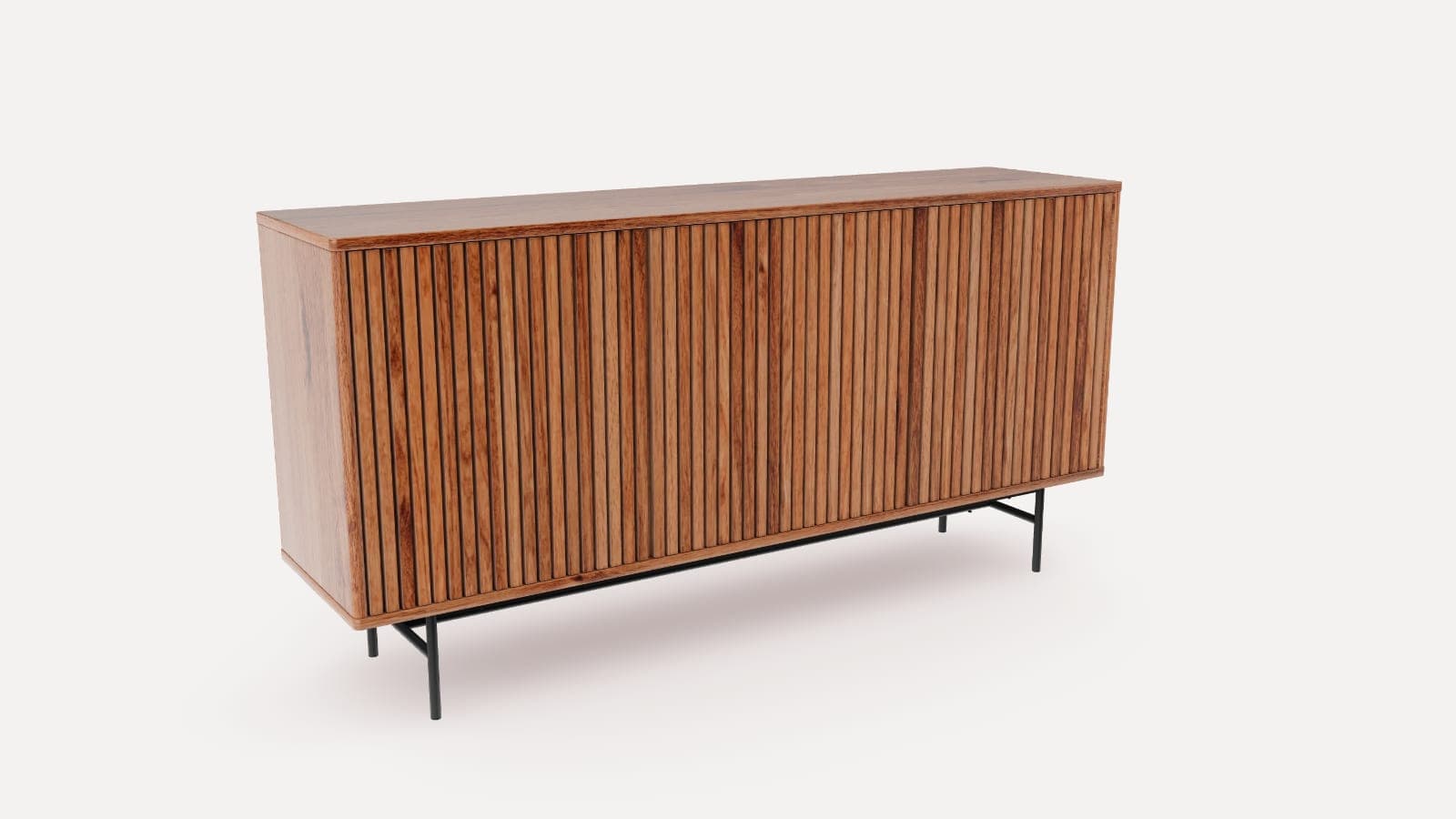
Imagine shopping online for a sideboard.
You find one you like, and the product page says it is 159 cm wide and 80 cm high. You get the tape measure out, mark the wall with a strip of tape, and try to picture it next to the sofa. It might block the socket, and the top might not line up with the window sill.
Many customers leave at that point and decide later.
View in room shows the size in the room itself. Instead of asking customers to imagine the sideboard, you let them stand it on their own floor at real size, through the camera of their phone, from the product page. With CharpstAR's 3D viewer, the same model that turns on the page is the one they see in their room, and there is nothing to install.
Try it on the sideboard below.
Furniture
Slatted sideboard
Three doors behind vertical slats, on steel legs.

Turn the sideboard and open Dimensions for its measurements. On a phone, press View in your room to stand it on your floor at real size, walk round it and compare it with the furniture already there.
What Is View in Room?
View in room is the button on a product page that opens a product in augmented reality (AR). The phone camera shows the customer's own room, and the 3D model of the product is placed on the floor at its real measurements.
On a furniture product page with view in room, customers can:
- Turn the product on the page and read its width, depth and height on the model
- Stand it on their own floor, in the browser
- Walk round it and move it along the wall to test different places
- Check it against the sofa, the doorway and the window already in the room
- Take a photo of it in place and share it with whoever else has a say
Apple's AR Quick Look shows the model on iPhones and iPads running iOS 12 or later, and Google's Scene Viewer shows it on Android phones that support ARCore and run Android 7.0 or later. No app is downloaded.
Why Use View in Room for E-commerce?
A photo cannot show whether a sideboard suits the wall it is bought for. View in room shows whether it fits.
Increase Conversion by Removing the Fit Question
Customers buy with more confidence when they have seen the product in their room. A sideboard that is clearly the right size for the wall, in a colour that works with the floor, leaves fewer reasons to hesitate, measure again or put the decision off.
Reduce Returns
Furniture is expensive to send back, and the wrong size or the wrong shade is a common reason for a return. When the customer has stood the product in the room before ordering, the size and the colour are no longer a surprise on delivery day. Our post on whether AR reduces returns goes through the published figures.
Fewer Questions to Customer Service
Customers often ask how deep a product is, how high the legs are and whether it fits under a window. With the measurements on the model and the product in the room, customers answer them on their own.
One Model for the Page, the Room and the Photos
One 3D model is used on the product page, in AR and for rendered product images. When a new finish is added to the range, the model shows it without a new photo shoot.
Use Case: A Sideboard
A sideboard is bought for one wall, and it has to work with everything around it, from the sockets and the skirting board to the sofa in front and the picture above.
How View in Room Works on the Page
The demo above shows what a customer does:
- Turn the sideboard on the page and zoom in on the slatted doors and the steel legs
- Open Dimensions to see its width, depth and height on the model
- Press View in your room on a phone, or scan the code shown on a computer
- Point the camera at the floor, and the sideboard appears there at its real measurements
- Move it along the wall, walk round it and compare it with the furniture already in the room
- Go back to the product page and add it to the cart
The sideboard in the demo is 159 cm wide, 40 cm deep and 80 cm high. Its 3D model is one file of under 1 MB.
What Reaches You
Nothing changes in your order flow. View in room sits on the product page as part of the viewer, and the customer buys through your own cart and checkout.
What the Shop Supplies
To put view in room on a product, we need:
- A link to the product page, with its measurements
- Product photos from several sides, or CAD or 3D files if you have them
- Samples or close photos of the finishes, so the wood and the paint read right in the room
We build the 3D model and the AR files, host them, and give you the snippet for the product page. The measurements are checked against the product page before the model goes live, because a model with the wrong size leads to returns.
How to Add View in Room to Your Website
You do not need to rebuild your online shop. The viewer goes on your existing product pages.
Step 1: Send Us a Product
Send a link to one product page. We build its 3D model and the AR files as a free sample within ten working days, so you can see your own product in your own room before you decide anything.
Step 2: Get a Plan and a Price
Within a working day, we tell you what your range needs and what it would cost.
Step 3: We Build the Models
We create the 3D models of your range, check every measurement against your product data, and prepare the AR file for iPhones and the one for Android phones. You test the viewer on your own page.
Step 4: Go Live
The viewer goes on your product page as one snippet on Shopify, Shopware, Magento, WooCommerce or a custom-built site, and we help you place it.
How to Measure the Effect of View in Room
Measure the feature against the figures you already track:
| KPI | What to measure |
|---|---|
| Conversion rate | Whether products with view in room convert more visitors into customers |
| Return rate | Whether fewer orders come back for the wrong size or colour |
| AR button presses | How many customers open the product in their room, and how many of them order |
| Customer support questions | Whether there are fewer questions about size and proportion |
| Photography costs | How many product photo shoots the 3D models replace |
Results depend on your products, your traffic and your prices, so compare the same products before and after.
How Much Does View in Room Cost?
View in room is part of the 3D viewer, and the viewer is priced per product. The Basic plan starts at 10 dollars per product per month, for at least 100 variants over 12 months, with the 3D models, AR and web integration, hosting, updates and implementation included. The Value plan starts at 20 dollars per model per month, for at least 100 models over 24 months, and adds custom dimensions, annotations, rendered product images and colour and texture configurators.
There are no setup fees, and the first product is free.
Is View in Room Right for Your Business?
View in room may be a strong fit if your products:
- Are bought for a particular place in the home
- Have a size that customers worry about
- Come in finishes or colours that depend on the room around them
- Have a high order value and expensive returns
Common uses include sofas, sideboards, tables, beds, wardrobes, lighting, rugs and outdoor furniture. Our guide to augmented reality for furniture retail covers the wider picture, and the post on what happens when you tap View in AR follows the phone step by step.
Put Your Furniture in Your Customers' Rooms
View in room lets customers see the product at real size, in their own room, before they order.
CharpstAR handles the whole process, from the 3D models to the viewer on your product page.
Want to see your own product in your room? Send us a product page and we will reply within a working day, or try the 3D viewer on more of our demos.
Questions
Does view in room need an app?
No. On an iPhone or iPad the product opens in Apple's AR Quick Look, and on an Android phone in Google's Scene Viewer. Both are built into the phone, and the customer stays in the browser.
Which phones support it?
iPhones and iPads running iOS 12 or later, and Android phones on the ARCore supported list running Android 7.0 or later. On a computer the button shows a code to scan with a phone.
Is the product shown at the right size?
Yes. The model carries the product's measurements, and the phone places it on the floor at that size. We check every measurement against your product page before a model goes live.
How long does it take to add view in room to a product?
The first product is built as a free sample, and a range of colour and material variants is usually live in about two weeks. A modular range takes longer, because its combinations have to be built as well.
Can customers share what they see?
Yes. Apple's AR Quick Look has a shutter button that saves a photo of the product in the room, and on Android a screenshot does the same. The photo can be sent to whoever else has a say in the purchase.
Sources
- Apple Developer, AR Quick Look: Quick Look displays USDZ files in 3D and AR on iPhone and iPad, on iOS 12 or later. https://developer.apple.com/augmented-reality/quick-look/
- Google ARCore documentation, Scene Viewer: 3D and AR experiences from a website on an ARCore supported device running Android 7.0 or later. https://developers.google.com/ar/develop/scene-viewer
- The sideboard in the demo: measurements read from its 3D model (159 x 40 x 80 cm), one file of 0.93 MB for the page and Android, 6.4 MB for iPhones, built by CharpstAR for this article.
- CharpstAR prices, read on 13 October 2026. https://charpstar.co/prices