3D for e-commerce5 min read
Getting your 3D products into Google Search: what Merchant Center actually requires
The real requirements for 3D and AR results in Google Search via Merchant Center: the virtual_model_link attribute, file format, size limits and the catch.
By CharpstAR · 4 Oct 2023 · Updated 22 Sept 2026
Part of 3D models for e-commerce: the complete guide

Product discovery used to mean a photo, a title and a price in a grid. Google now supports something more: a 3D model that a shopper can spin inside search results, and in some cases place in their room with augmented reality without ever visiting your site.
That sounds like a big deal, and it can be, but the requirements and the limits are very specific. This article sticks to what Google's own documentation says, because there is a lot of secondhand advice about this feature that is either out of date or invented.
What the feature is
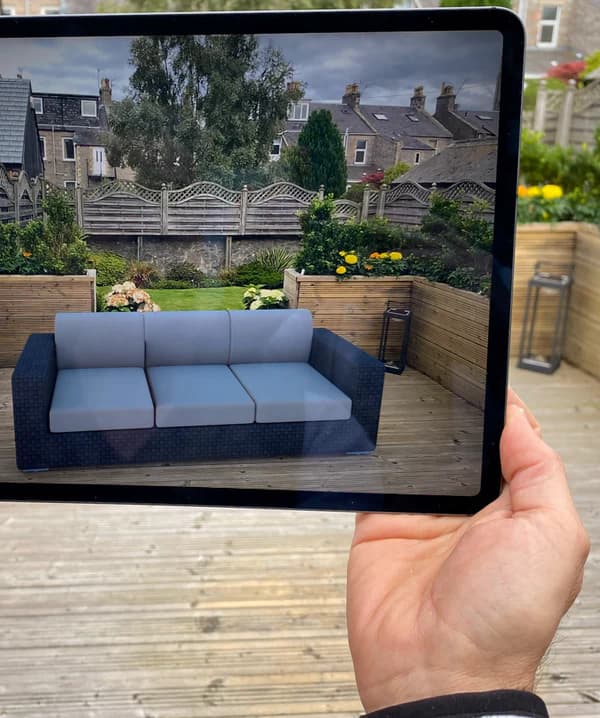
In Google Merchant Center you can attach a 3D model to a product using the `virtual_model_link` attribute. When the model is approved, Google's documentation says it can display on Google Search so that shoppers view your product from different angles and use augmented reality to view how your product looks in their space.
So it is two things at once: an interactive 3D view inside the search result, and an AR placement launched from there. The shopper has not clicked through to you yet at that point, which is worth thinking about carefully. You are putting a better version of your product in front of someone earlier in the journey, and the same model can serve the product page they land on afterwards.
The requirements, as documented
Google's help page for the attribute is unusually concrete, which is helpful when you are briefing a 3D supplier.
| Requirement | What Google states |
|---|---|
| Attribute | `virtual_model_link` |
| File formats | glTF (.gltf) and GLB (.glb) only |
| File size | 10 MB recommended, must not exceed 15 MB |
| Textures | 4K has the broadest support on mobile and is the largest recommended texture size |
| URL | Must be a crawlable http:// or https:// URL, up to 2000 characters |
| Review | Google reviews the model before it appears, which may take up to two weeks |
| Market | Limited to products sold in the US |
| Categories | Recommended for shoes and apparel, and for home goods |
Read the last two rows again, because they are the ones that decide whether this is relevant to you right now. The attribute is limited to products sold in the United States, and the recommendation is aimed at specific categories rather than the whole catalogue. If you are a European brand with no US storefront, this is a thing to prepare for rather than a thing to ship this month.
The practical consequences for how models get built
The file size cap is the constraint that actually bites. Fifteen megabytes is a hard ceiling and ten is the target, and a naively exported model with uncompressed 4K textures on every material will blow through that immediately.
What gets you under the limit without the product looking cheap:
- Compress the geometry. Most furniture and footwear models carry far more polygons than they need for a viewer at phone size.
- Use texture atlases rather than a separate set of maps per part, and compress the textures rather than shipping raw PNGs.
- Reserve 4K for the materials a shopper will look at closely, and drop the rest to 2K or 1K. Nobody zooms into the underside of a chair.
- Bake what can be baked, so the model does not depend on lighting tricks the viewer will not run.
The same discipline pays off twice, because a model that fits Google's budget is also a model that loads fast on your own product page. If you are commissioning 3D work, put the 15 MB ceiling in the brief from the start. Retrofitting it later is more expensive than hitting it first time.
Crawlability is the step people forget
Google has to be able to fetch the file. That means the model URL is served publicly, is not blocked in robots.txt, and does not sit behind a signed URL that expires. Plenty of e-commerce setups host 3D assets on a CDN path that is excluded from crawling by default, and the model then silently never gets approved.
Check this before you wait two weeks for a review that was never going to happen.
What this does and does not change about discovery
It changes the quality of the impression. A product that can be rotated in the result is a product a shopper understands before they click, and that tends to mean fewer wasted clicks and better-qualified traffic.
It does not change your ranking. There is nothing in Google's documentation that says attaching a 3D model improves where your product appears, and you should be suspicious of anyone who tells you otherwise. Treat it as a presentation upgrade on impressions you already earn.
It also does not replace the work on your own page. The shopper who spins the model in search still has to arrive somewhere that answers price, stock, delivery and returns. The 3D model is one part of a page that has to do the rest properly.
The reusable asset argument
The reason we think this is worth doing even before the US limitation lifts is that the file is the same file. A compressed GLB under 10 MB with real-world dimensions is exactly what you need for a product page viewer, for web AR through Scene Viewer on Android and AR Quick Look on iOS, for a configurator, and for rendering campaign images. Merchant Center is one more destination for an asset you should have anyway.
That is how our own clients have used it. Sweef built one set of sofa models and ran them through the configurator, the product pages and the marketing imagery. MELIMELI reused the same models across shop and campaign. Contura uses them to let customers place a wood-burning stove in a real room before ordering. None of that work has to be redone to feed a product feed.
A short checklist
- Confirm the product is sold in the US, since the attribute is limited to US products.
- Produce a GLB under 10 MB, correctly scaled in metres, with textures no larger than 4K.
- Host it at a stable public URL that Google can crawl.
- Add `virtual_model_link` to the product in your feed.
- Allow up to two weeks for review, then check the product in Merchant Center rather than assuming.
If you want to see whether your products can hit that file budget without losing quality, we will build one model for free and hand you the GLB. Send us one product. What we produce for a full catalogue is described on solutions, and pricing is on prices.
Sources
- Google, virtual_model_link attribute, Merchant Center Help.
- Google, Scene Viewer developer documentation.
- Apple, AR Quick Look.